|
|
|
Free Software
|
|
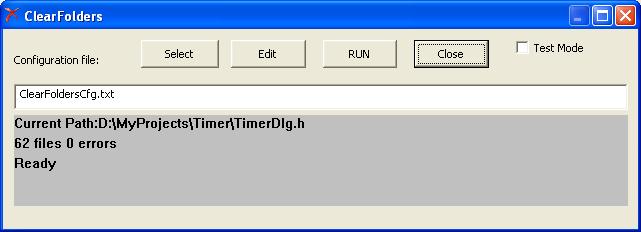
Clear Folders software for bulk files removal.
The program for the frequent removal of temporary files such as (*. ncb *. pdb
*. obj). Deletes all files from a specified directory and sub-directories, using
a filter file name. Has a test mode, in which the files are not deleted, but
only creates a list of files to delete. Can create Log file. Works through a
configuration file, which can be specified on the command line.
The configuration file has the format:
KEY = VALUE
(!) First, set the values of folder processing parameters, then should be the
folder name
PATH=
Example configuration file.:
CREATELOG=TRUE
SHOWLOG=TRUE
LOGFILE=ClearFolders.log
FILTER=*.obj;*vcproj.*;*.ncb
PATH=D:\WORK
FILTER=*
PATH=D:\TEMP |
(!) Settings are saved for next folder. In this example, for the directory
D: \ TEMP options LOGFILE, CREATELOG, SHOWLOG will have the
same values as for D: \ WORK
Flag "Test Mode" is used to verify FILTER parameter in
this mode, files are not deleted but only recorded in the log file.
| KEY |
DEFADEFAULT VALUE |
DESCRIPTION |
| FILTER |
NO |
Specifies a list of masks separated by
';' |
| INVERSEFILTER |
FALSE |
If TRUE, it will delete all files except matching
mask |
| PROCESSSUBFOLDERS |
TRUE |
FALSE = Subfolders are not processed |
| CREATELOG |
FALSE |
TRUE = Create log file. |
| LOGFILE |
ClearFoldersLog.txt |
Log file path |
| SHOWLOG |
FALSE |
TRUE = Show log file after completion of processing |
| AUTORUN |
FALSE |
TRUE to work through the command line, starts
processing immediately after start of the program |
| AUTOEXIT |
FALSE |
TRUE to work through the command line, TRUE to work
through the command line, close "clear folders" after completion of
processing
|
| PATH |
NO |
folder path |
download
|
|
|
|
Free Software:
Remote Control - Remote desktop access tool.
ImageConverter - Free software to reduce size of pictures.
AutoShutdown - Free automatic shutdown tool.
Work Time Counter easy tool.
BOOTSAVER - Save and restore boot sector software.
ClearFolders - software for bulk files removal.
SynchronizeFolders - Program for frequent copying files.
DiskSector - Software to read / write disk sectors to / from file.
RopTest - Program for visual selection of Ternary Raster Operation code.
HEX Dump - ActiveX controls for viewing and editing data in hexadecimal (HEX) format.
15 slide puzzle - 15 slide puzzle game.
|
©2011 All rights reserved.